SMS program
CallHeim SMS alerts
CallHeim sends text messages for two reasons: a one-time code to verify your phone number, and on-call incident alerts you set up yourself. Everyone opts in personally, inside the app. CallHeim never sends marketing or promotional texts.
The program
At a glance
- Program name
- CallHeim on-call alerts and verification codes
- Who is texted
- People who work for CallHeim’s business customers and have added their own mobile number to their CallHeim profile. CallHeim is business-to-business on-call and incident-alerting software.
- Message types
- One-time verification codes, and on-call incident alerts for duty the user has configured. Only these: no marketing or promotional texts are ever sent.
- Message frequency
- Message frequency varies.
- Cost
- Message and data rates may apply.
- Opt out
- Reply STOP to any CallHeim text, or remove the number on your Profile.
- Help
- Reply HELP to any CallHeim text, or use the Help Center at app.callheim.com.
Opt-in
How a person opts in
Each person does this for their own number, in the CallHeim app, by following the steps below.
Step 1: Sign in to CallHeim
Open the CallHeim app at app.callheim.com and sign in to your workspace.
Step 2: Open your Profile
Find the card titled “Phone number (SMS / voice) — verification”.
Step 3: Type your own mobile number
Choose the country if the card asks for one, then type your number in the Phone number field.
Step 4: Read the consent text
The card shows it before anything is sent. The exact wording is on this page, below.
Step 5: Select Send code
CallHeim texts a 6-digit verification code to that number.
Step 6: Enter the code and select Verify
The number is saved only after the correct code has been entered.
Step 7: Incident alerts are a separate choice
SMS incident alerts go only to people who have also added SMS as a step in their own paging rules.
Consent
The consent text people see
This is the wording shown on the Phone number card, directly above the Send code button.
By selecting Send code, you agree to receive text messages from CallHeim at this number: a one-time verification code now, and on-call incident alerts if you add SMS to your paging rules. Message frequency varies. Message and data rates may apply. Reply STOP to opt out or HELP for help. See our Terms and Privacy Policy.
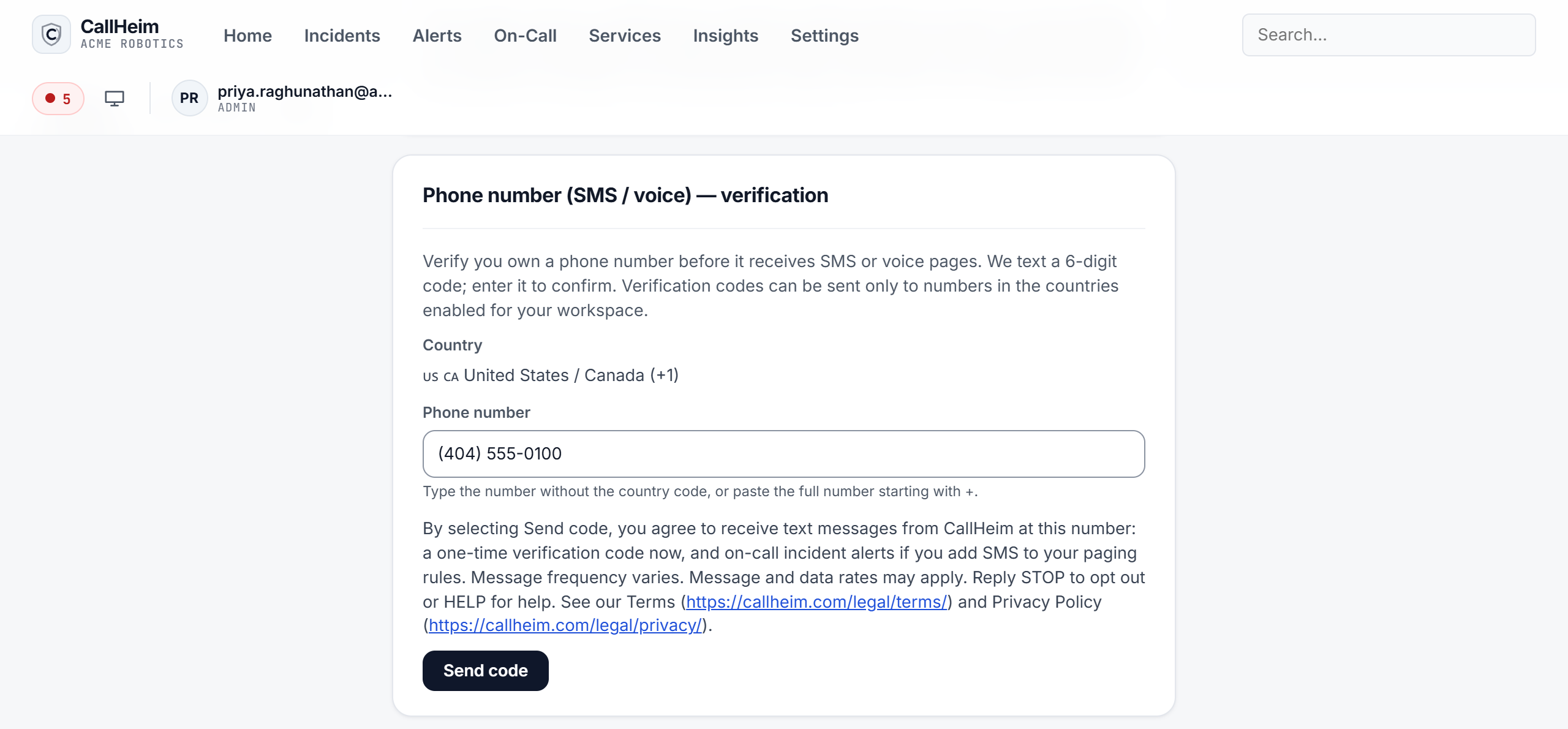
The Phone number (SMS / voice) verification card on the Profile page of the CallHeim app, with the consent text above the Send code button.
Messages
Sample messages
The two kinds of text the program sends: a verification code, and an incident alert.
CallHeim: Your one-time verification code is 481920. It expires in 5 minutes. Reply STOP to opt out or HELP for help.
CallHeim [Incident] Checkout API 5xx rate above 2% Ack: https://ack.callheim.com/v1/ack/{one-time-token} Reply STOP to opt out.
Control
Opt out and get help
Opt out
Reply STOP to any CallHeim text at any time. You can also remove your number from the Phone number (SMS / voice) card on your Profile. Text messages to that number then stop. Your e-mail and other notification channels are not affected.
Help
Reply HELP to any CallHeim text. If you are signed in, the Help Center at app.callheim.com is the place to ask a question or report a problem.
Message frequency varies. Message and data rates may apply. Delivery depends on your mobile carrier and coverage, so a text can arrive late or not at all. Carriers are not liable for delayed or undelivered messages.